This AMEX Email Phishing Scam Wants You Homeless & Poor, With A Zero FICO Score
PALM BEACH, FL – Nothing could better destroy your holiday spirit than a compromise of your most secure personal information in the form of a phishing expedition. Here is one of the latest email scams circulating what is probably hundreds of thousands of inboxes, just in time for Christmas.
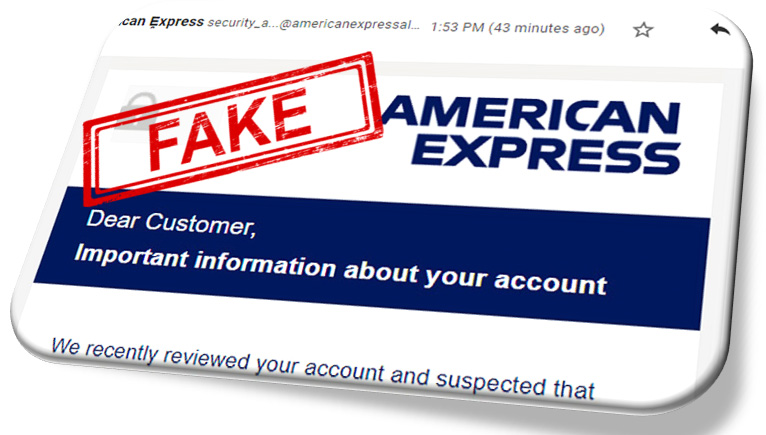
Here is how it all plays out: You receive an email which appears to be from American Express, but it isn’t, it’s from some scrupulous hacker hiding somewhere behind a computer who is looking to steal your identity.
Fake American Express Email (Classic Email Phishing Attempt)

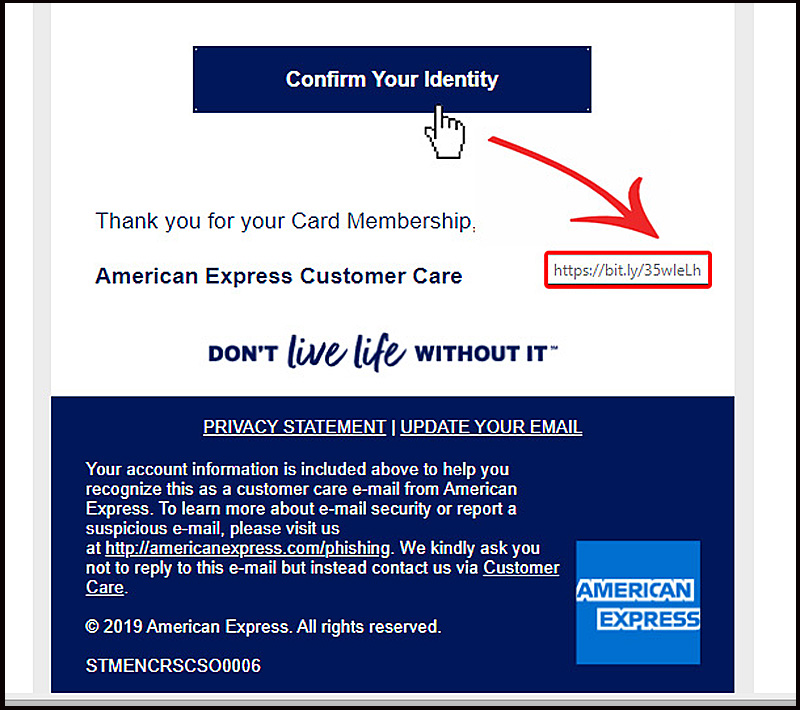
Hovering Over the Fake Button
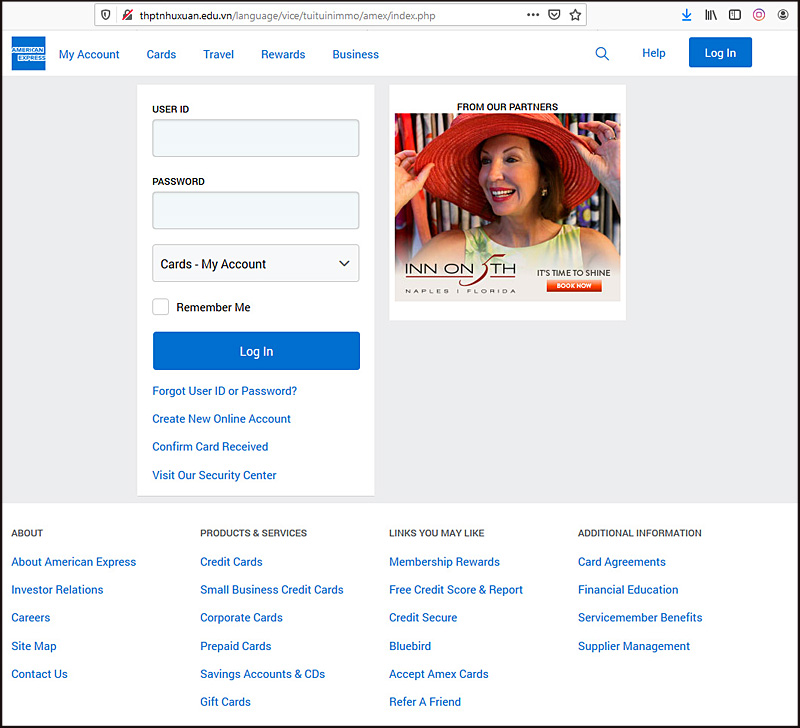
After clicking on the button in the fake email, users are sent to a fake website which is designed to look identical to an authentic American Express website. A link shortening service called “Bitly” is being used to hide the long fraudulent looking site address which will be visited.
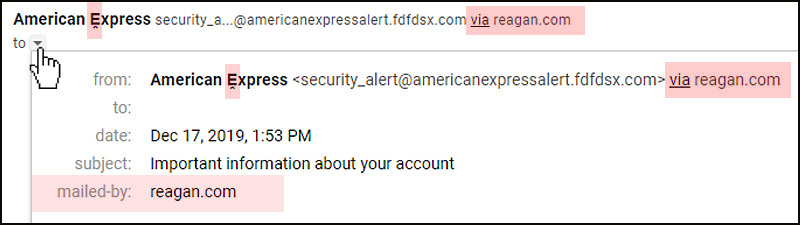
A Better Look at the Sender (Fake)
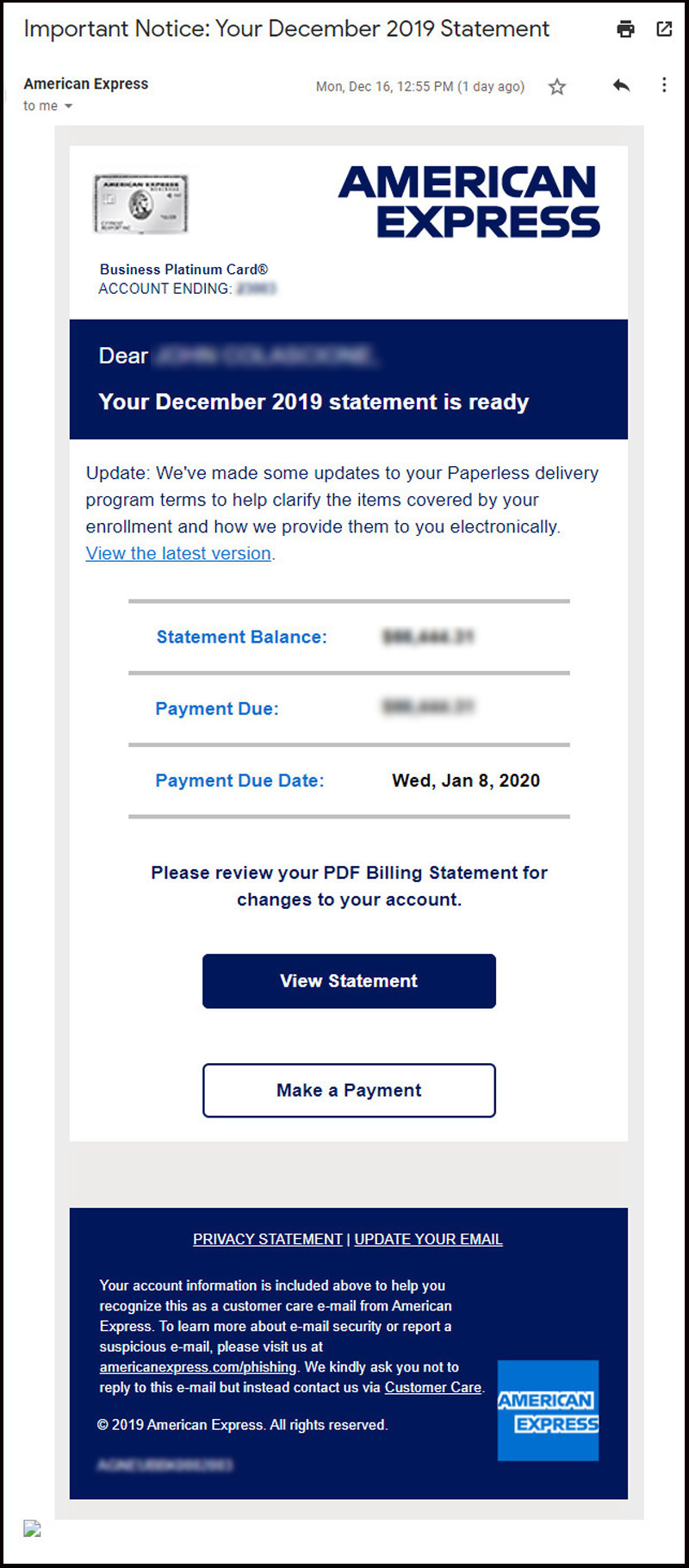
American Express Email (Real)
It is both increasingly and incredibly important to examine very closely any emails received which suggest you login anywhere or enter in any personally identifiable information, especially any financial accounts yet anything that stores any of your personal information can be used to compromise your safety and security.
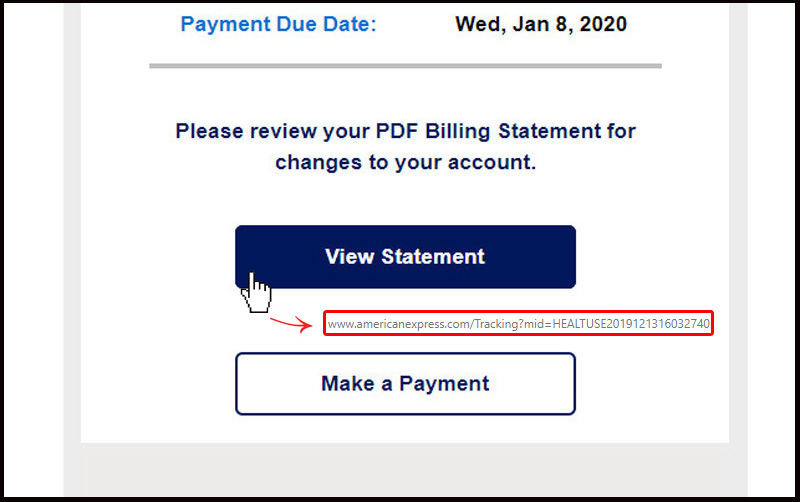
AMEX Button Link (Real Email)
A Better Look at the Sender (Real Email)
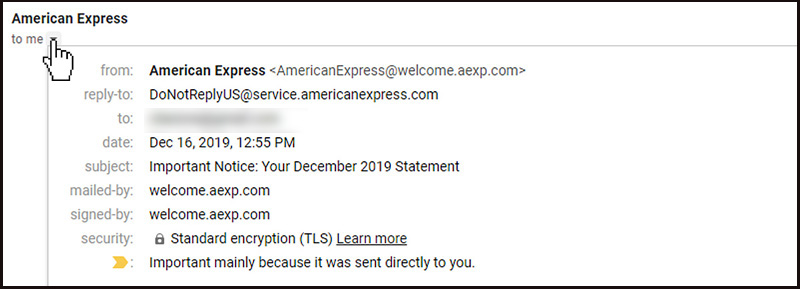
Clicking on the tab on the top left lets you see a little more about the sender of the email and who exactly it was sent to. The above feature is shown in Gmail, but most if not all email clients have a similar feature.
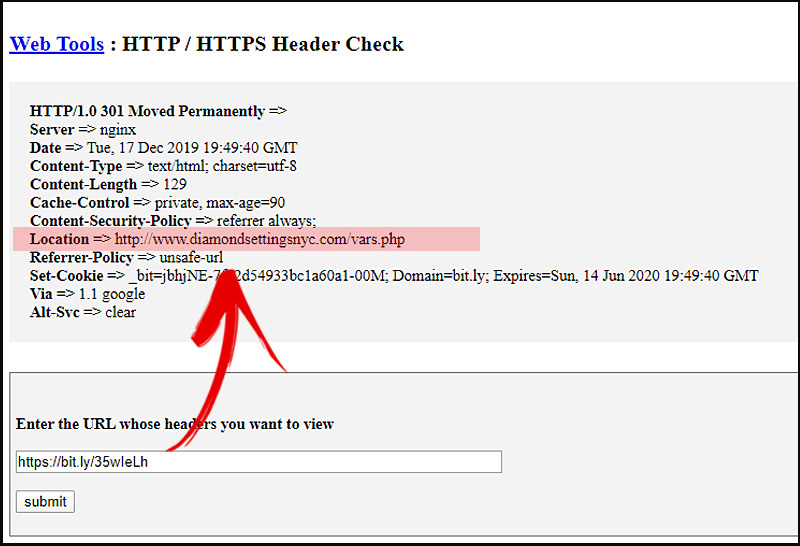
The Sneaky Redirect (Linked from the Fake Button)
The short cleaner looking link uses what is called a “301” server side redirect which, as soon as it loads, just sends (or redirects) people to a different web address. Many people do not even notice the redirect take place. Ordinarily, these redirects are helpful to web site owners who change their web address to help visitors find the correct location; here it is being used for trickery.
The Fake Website (Here Is Where They Really Do The Damage)


Second Page To Steal More Of Your Information
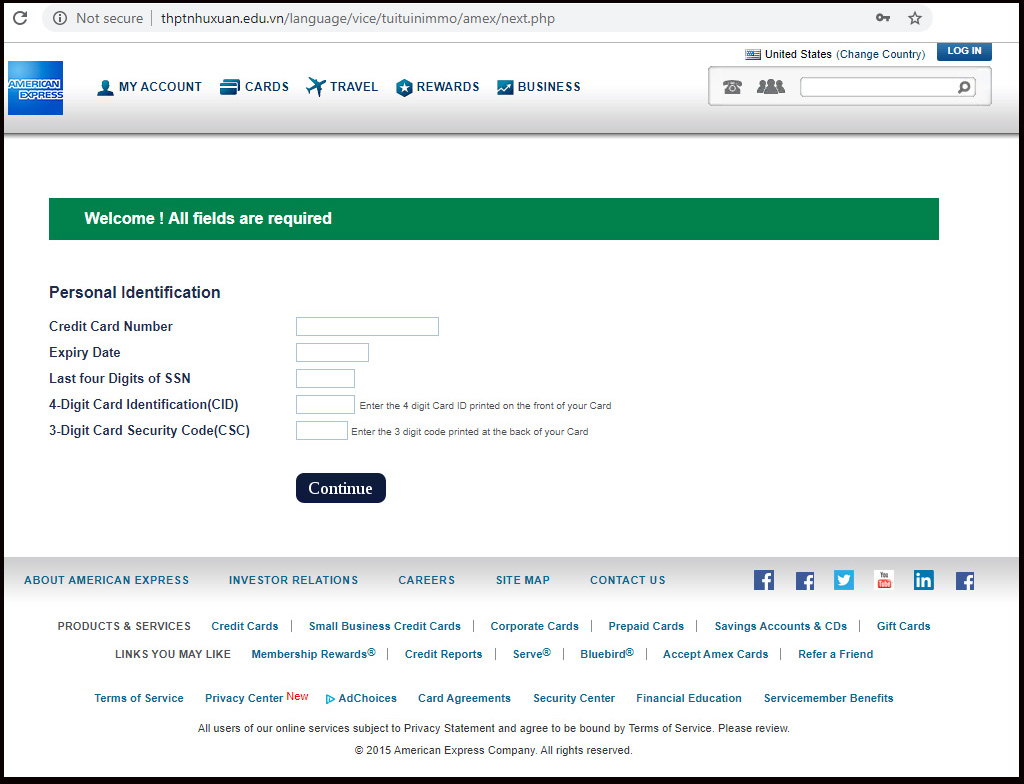
Third Page To Steal, Even More!
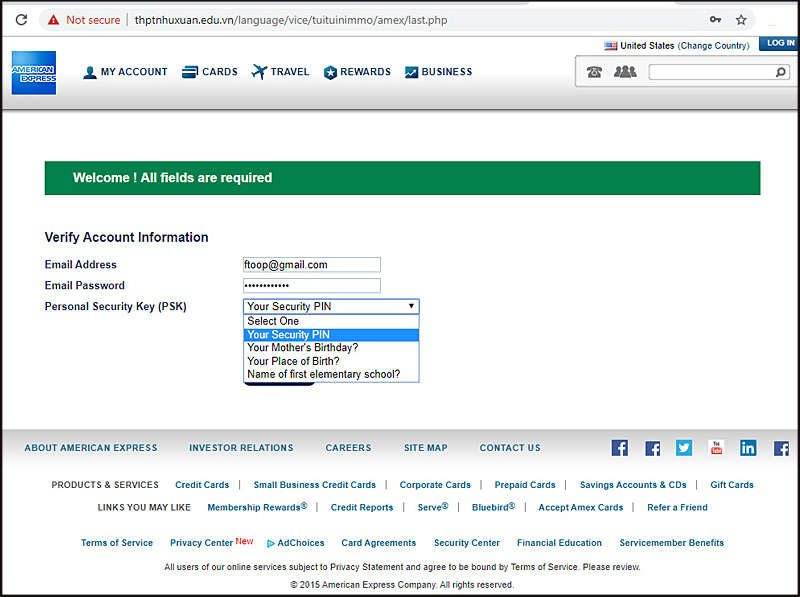
The End of this Compromising Run-a-Round Scheme
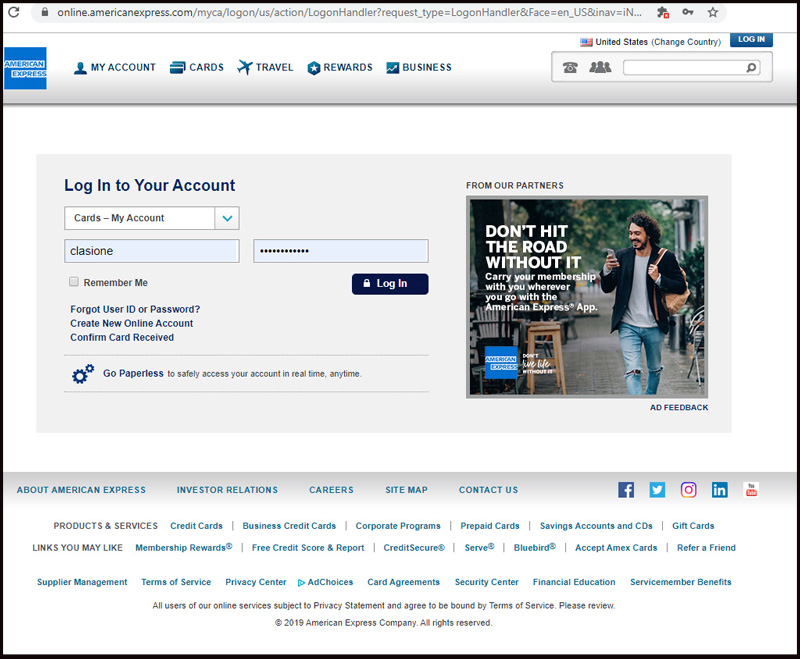
This is where you end up if you are truly unlucky enough to have completed this entire process. You have only left to now login and see all of your ordinary information while some criminal is off to the dark-net web to distribute and sell your most secure personal information.
Other Scams to Look-Out For
- FedEx Email Phishing Scam Attempt: Not That Clear What Actual Motive Is
- Email Phishing Campaign Using Legitimate Top-Level Domain to Evade Spam Filters
- Phishing: Watch-out for New Dangerous Godaddy Email Phishing Attempt
- Weak Attempt at Phishing Network Solutions Account Holders
- Verizon Wireless Phishing Email: Scams & How to Avoid Them (Part 2)
- Just Some Fun With an Online Classifieds Scammer from Craigslist, That’s All
- Fake Verizon Wireless Email: Email Scams & How To Avoid Them
What do I do if I receive a phishing email claiming to come from American Express?
Be sure to follow this site to stay up to date with some of the latest security and privacy issues. I don’t always have the time to detail them as much as I would like, but when I can, I’ll certainly keep you in the loop of what to look out for, this way you don’t wind up homeless and poor, with a zero FICO score. Subscribe to these headlines.
PLEASE NOTE: THE IMAGE OF EMAILS LABELED (FAKE) WERE NOT SENT FROM AMERICAN EXPRESS®. IF YOU RECEIVE IT, IT’S A FAKE. IT IS BEING USED AS AN EXAMPLE OF AN ACTUAL “PHISHING” EMAIL I RECEIVED. THIS IS HERE TO HELP OTHERS AVOID SIMILAR FAKE EMAILS AS WELL AS TO ILLUSTRATE HOW THESE PHISHING SCAMS WORK IN DETAIL.

About The Author: John Colascione is Chief Executive Officer of SEARCHEN NETWORKS®. He specializes in Website Monetization, is a Google AdWords Certified Professional, authored a how-to book called ”Mastering Your Website‘, and is a key player in several online businesses.
Add STRATEGIC REVENUE as a Google Preferred Source to see more of our business, technology, and digital strategy coverage in Google Search.
Add Strategic RevenueYou can now select the categories you're interested in and receive email updates when new articles are published in only those categories.