How to Write a 301 .htaccess Redirect for URLs Containing Particular Character
WEST PALM BEACH, FL – AI is incredible. It can help you with just about anything, including writing programming codes. I’ve been blown away several times by the power of Artificial Intelligence these days, and it keeps getting better and better.
Recently I needed to write a specific redirect for a weebsite and I was not sure how to do it, so I checked with ChatGPT. The answer was a as easy and writing the question and waiting about 3-4 seconds.
How could I write an .htaccess redirect that would 301 redirect any URLs that contain a “+” sign in them?

To write an .htaccess rule that performs a 301 redirect for URLs containing a + sign, you can use the RewriteCond and RewriteRule directives in combination with regular expressions. Here’s a code snippet that will match URLs containing a + and redirect them to a different page (or structure) of your choice.
Example .htaccess Code:
RewriteEngine On
RewriteCond %{REQUEST_URI} \+
RewriteRule ^(.*)$ https://www.yourdomain.com/new-url [R=301,L]
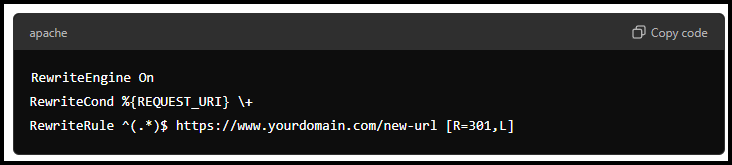
Explanation:
RewriteEngine On: Enables the rewrite engine.RewriteCond %{REQUEST_URI} \+: This condition checks if the request URL contains a+symbol (\+escapes the plus sign in regex).RewriteRule ^(.*)$ https://www.yourdomain.com/new-url [R=301,L]: Redirects the matched URL to the specified new URL using a 301 (permanent) redirect. Replacehttps://www.yourdomain.com/new-urlwith the URL where you want the traffic to go.
Make sure to replace new-url with the actual target page, and test it thoroughly to ensure it works as expected!

John Colascione is Chief Executive Officer of SEARCHEN NETWORKS®, a digital marketing and technology company founded in 2001. An entrepreneur, author, and digital publisher with more than 25 years of experience, he specializes in search engine marketing, Website Monetization, domain names, and online business development. He is the author of Mastering Your Website and publishes commentary on technology, digital marketing, and the evolving Internet economy. Read more at JohnColascione.com.
Add STRATEGIC REVENUE as a Google Preferred Source to see more of our business, technology, and digital strategy coverage in Google Search.
Add Strategic RevenueYou can now select the categories you're interested in and receive email updates when new articles are published in only those categories.