
 *** Here Is A List Of Some Of The Best Domain Name Resources Available ***
PALM BEACH – Sometimes I just hate Google, and I must admit, those times come a heck of a lot more often these days than they did in the past. I personally used to consider Google an ambiguous friend; always quietly working for me in the background, creating all new interesting ways for me to beat-out the competition. Assigning me that “competitive edge” through working smart and not hard. Allowing experienced know-how to tear through competitors and level the playing field making the average web-guy able to compete with corporate giants.
Now a days, not so much. Google seems to just run over everyone like a Mack-truck on the freeway at eighty-miles-an-hour. They have become experts at gobbling up everything that can for themselves be it content, traffic, revenue – whatever, and doing anything and everything they can possibly do to benefit ‘Google‘ regardless of what or who is in the cross-hairs. This is why they are continually under so much scrutiny these days.
Anyway, a few days ago, Google began removing the “WWW” and “HTTPS” from its Chrome web browser in version Chrome 76 calling the WWW and HTTPS trivial nonsense and just an irrelevant ‘distraction’.
The Chrome team values the simplicity, usability, and security of UI surfaces. To make URLs easier to read and understand, and to remove distractions from the registrable domain, we will hide URL components that are irrelevant to most Chrome users. We plan to hide “https” scheme and special-case subdomain “www” in Chrome omnibox on desktop and Android in M76.

This is at least the second time Chrome has moved to change URLs:
In Sept 2018, we rolled out a change to hide special-case subdomains “www” and “m”. Per my above message on this thread, we rolled back these changes, and announced our intent to re-ship an adjusted version: we will hide “www” but not “m”. For several months, we’ve had this version enabled in our Canary, Dev and Beta channels and are confident that it is ready to be enabled in the Stable channel as well.
I remember when Google was contemplating removing URLs all together [replacing them with a brand] calling them unintelligible strings of gibberish”, replacing web addresses with something a little less complicated.
People have a really hard time understanding URLs,” says Adrienne Porter Felt, Chrome’s engineering manager. “They’re hard to read, it’s hard to know which part of them is supposed to be trusted, and in general I don’t think URLs are working as a good way to convey site identity. So we want to move toward a place where web identity is understandable by everyone—they know who they’re talking to when they’re using a website and they can reason about whether they can trust them. But this will mean big changes in how and when Chrome displays URLs. We want to challenge how URLs should be displayed and question it as we’re figuring out the right way to convey identity.”
Such a change could have looked more like this below:
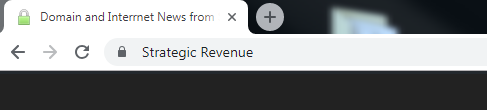
For whatever reason, I don’t like it. I guess I’m just not used to it. I like to see the “www” and I like to know whether a site is using either https://www, or only https:// without “www” and with this change I can’t easily see it. It does matter for development and using canonical tags for URLs and such. The browser does show it if you double click inside the address bar area, but that is an additional step which is annoying.
Hopefully Microsoft and Firefox won’t follow suit.
If you are not happy with this change, there is a way to reverse it by going into your Chrome settings and turning this function off.
How to show “www” and “https” in Chrome:
- Open the Chrome browser and enter into the address bar the following “chrome://flags/#omnibox-ui-hide-steady-state-url-scheme-and-subdomains” and press Enter.
- Chrome will open a page that shows a warning “WARNING: EXPERIMENTAL FEATURES AHEAD! By enabling these features, you could lose browser data or compromise your security or privacy. Enabled features apply to all users of this browser.”
- Look for (its far down so you might want to use find and replace to locate it on the page): “Omnibox UI Hide Steady-State URL Trivial Subdomains”.
- Change the setting to “Disabled”.
- A message will appear that says, “Your changes will take effect the next time you relaunch Google Chrome.”
- Click the “Relaunch Now” button and the browser will restart.
Bingo-Bango, your (or my) favorite little insignificant nonsense URL identifiers are back.


About The Author: John Colascione is Chief Executive Officer of SEARCHEN NETWORKS®. He specializes in Website Monetization, is a Google AdWords Certified Professional, authored a how-to book called ”Mastering Your Website‘, and is a key player in several online businesses.
This has already been the case on Chrome mobile.
Honestly I do like this change. I think it helps the domain industry actually.
John, thanks for the heads up on this change,
geoffrey
so the only thing that appears in the address bar is the domain name. Nothing else.
cooking, homes, bedtimestories. seems good…