Authorship: Hooking Up Your Site with Your Google+ Page and YOU
I’m jumping right on the bandwagon with all of this Google+ stuff and advising others to use it without much hesitation because I’m pretty certain I know where it’s all going; I posted about it last year in fact. Google will use the power of its intermingling services to compete and possibly beat Facebook.com and other fast rowing social networks by rewarding sites which participate – with better rankings on Google. That’s the game at play, and a winning strategy for the search conglomerate in my opinion.
Are you ready to jump on the Google+ bandwagon with your site? Need a cool new “SEO phrase” to get you all warm and fuzzy about it? It’s already being dubbed “AuthoredPageRank”, and when the majority of the webmaster community measures the results and improvement in visibility, Google’s + numbers are going to begin to skyrocket, as if they haven’t already started to do that.
Here is how you start taking advantage of it:
The below steps will associate your Google+ activity with your web site. If you have business page, start by connecting the business page to your web site with the meta tag shown below. Then connect your personal page with your blog section or the whole site by adding your site into your Google+ profile settings under the “connections” settings.
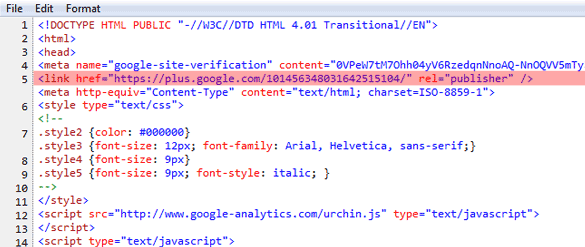
1. Add this to your header section in between <head> and </head>
<link href=”https://plus.google.com/[GOOGLE-PAGE-ID-#-HERE]/” rel=”publisher” />
This will attach your web site to the business page.
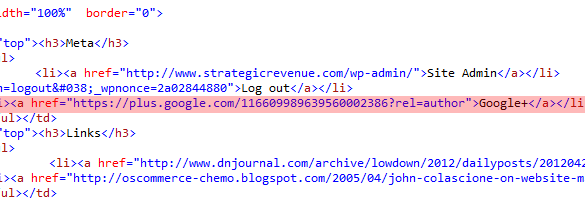
2. Add this to your side bar (or wherever it fits): Look at mine on right —->
<a href=” https://plus.google.com/[GOOGLE-PERSONAL-PAGE-ID-#-HERE]”>Google+</a>
This will attach the blog section to you personally.
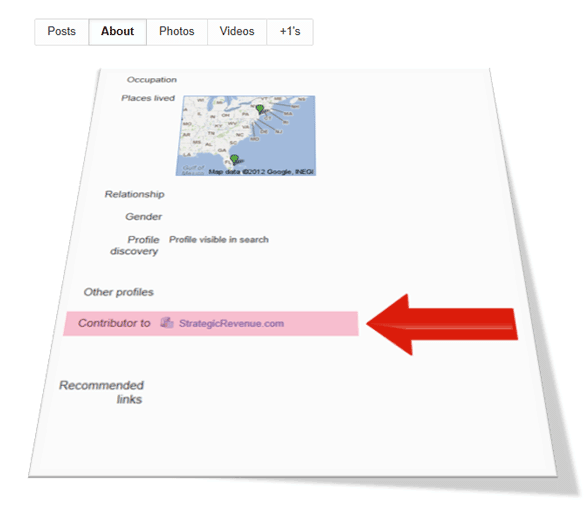
3. Go to your Google+ Account and log in to your personal page profile setting
Under the contributors section add a link to the site you have added a Google+ link on. This process with complete the circle (connection) of your personal Google+page to your site you added the link on. Google+ Profile —> Edit Profile —> Contributor to
The official instructions straight from the horses mouth are here.
After you take the above steps I have seen it work in about five (5) to seven (7) days. By work I mean, you begin to see you’re spectacular face or little icon avatar along side your Google results. I’ve also seen removing the tags remove it from Google the same day. So getting it to appear takes a little longer than removing it from search results.

About The Author: John Colascione is Chief Executive Officer of SEARCHEN NETWORKS®. He specializes in Website Monetization, is a Google AdWords Certified Professional, authored a how-to book called ”Mastering Your Website‘, and is a key player in several online businesses.
Add STRATEGIC REVENUE as a Google Preferred Source to see more of our business, technology, and digital strategy coverage in Google Search.
Add Strategic RevenueYou can now select the categories you're interested in and receive email updates when new articles are published in only those categories.